
Nice G.O.
Nice North America LLCHouse & Home
4.6284.00 Reviews
- Version
- 1.1.11
- Installs
- 10.00K
- Age Rating
- Everyone
Screenshots
Our Review of Nice G.O.
 Analysis by Appyee
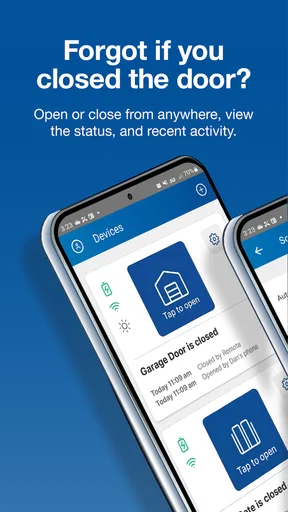
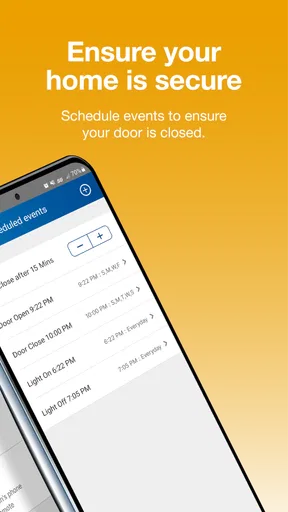
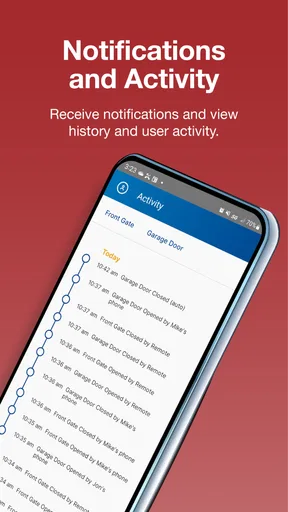
Opening a garage door sounds like a small task, but it can become surprisingly awkward when your hands are full, the weather is poor, or reaching the wall-mounted control is difficult. Nice G.O. is a free House & Home app from Nice North America LLC that puts mobile access and control of compatible garage doors in a phone-based interface. After spending time with it, I see the appeal clearly: it can make an ordinary arrival or departure less dependent on physical access to a button.
My overall impression is positive, especially for households that already use compatible Nice equipment and want a simpler way to interact with it. The app has a 4.6 average from around 1.8 thousand ratings, and it has passed the ten-thousand-install mark. Those figures suggest a modest but active user base rather than a mass-market smart-home platform. It is free, rated for Everyone, and the current version is 1.1.11, with support beginning at operating system version 10.
The important distinction is that this is not a general garage-management tool for every door. Its usefulness depends on compatibility with the Nice setup already installed at your property. If that relationship is in place, the app can be a practical remote control. If it is not, downloading it will not turn an ordinary garage opener into a connected one by itself. That compatibility question should be the first thing you settle before changing your routine around the app.
How clearly the app works when reading and navigating matters
For a garage-control app, I do not want a busy dashboard filled with unrelated smart-home features. The main job is easy to understand: open or close the garage door from a phone. That narrow purpose is a strength because it gives the interface a clear mental model. You are not learning a complicated automation system before you can perform a basic action.
I also appreciate that mobile control can reduce the need to interpret a small physical control panel in a dim garage. A phone screen is familiar to most people, and its text and controls can often be enlarged through the device’s own display settings. That makes the experience potentially easier for users who struggle with tiny labels, low contrast, or an awkwardly placed wall button.
Still, a familiar phone is not automatically an accessible phone. The quality of the experience depends on how clearly the app labels its controls, how it communicates the current door state, and whether important feedback is easy to distinguish. A large button that sends a command is not enough if I cannot confidently tell whether the door is open, closed, or still moving. For a safety-related action, status clarity matters as much as the command itself.
My practical advice is to test the app at different times of day rather than only in a bright room. Try it while standing in the garage, in the driveway, and indoors. Check whether you can quickly identify the control without staring at the screen for too long. This is especially useful for older family members or anyone who finds changing light, glare, or small interface elements tiring.
Why the phone interface can be easier than the wall control
The app’s biggest readability advantage is flexibility. A wall-mounted button has a fixed position, fixed physical size, and fixed visual presentation. A phone can be held closer, viewed at a preferred angle, and adjusted using system-level text or display settings. Someone who cannot comfortably reach the usual control may also find it easier to position a phone within their available range of motion.
That does not mean every user will prefer the app. A person with limited vision may rely more on tactile feedback than on a screen, while someone who has difficulty with precise taps may find a physical button easier to locate. The best arrangement may be to keep the existing control available and use Nice G.O. as an additional route rather than a replacement.
I would also avoid assuming that a single glance proves the door has responded. When leaving home, I would pause long enough to confirm the result rather than tapping and immediately driving away. That small habit is more important for users who cannot easily look back at the door or who may not notice movement from inside the vehicle.
Motor, sensory, and cognitive considerations in everyday use
Remote control can remove several physical steps. You may not need to walk to a wall panel, stretch toward a high control, or operate a small button with a fingertip. For a person using a mobility aid, carrying groceries, or dealing with temporary pain, that reduction in movement can be meaningful. It is one of the strongest reasons to consider this app rather than treating it as a novelty.
A realistic example is arriving home with a child in one arm and bags in the other. Instead of putting everything down to reach the control, I can prepare the phone before pulling into the driveway and use it when appropriate. The benefit is not that the app makes the arrival automatic; it is that it changes where the required interaction happens and can make the sequence less physically demanding.
There are sensory advantages as well. A phone can be held at a comfortable distance and may be easier to use than a control hidden in shadow. If the app provides clear visual confirmation, that can help people who do not reliably hear a motor starting or stopping. Conversely, a user who depends on sound or vibration should not assume that every important state change will be communicated in the way they need. I would treat visual confirmation as essential and regard other feedback as something to verify during setup.
The cognitive side deserves attention. A focused app is easier to explain to a family member than a large smart-home system with scenes, schedules, cameras, and unrelated devices. The basic workflow can be taught as a short sequence: open the app, identify the garage control, issue the command, and confirm the state. Keeping that routine consistent is helpful for anyone who benefits from predictable steps.
At the same time, remote access introduces a new kind of uncertainty. With a physical button, I can often hear or see the mechanism immediately. With a phone, the command may feel abstract until I check the door. Users with memory difficulties may need a simple household rule, such as confirming the closed state before going to bed, rather than relying on the fact that they tapped the app earlier.
Where it helps and where it does not
Nice G.O. is particularly useful when the barrier is distance or reach. It can help a driver who cannot comfortably exit the vehicle, a caregiver assisting someone at home, or a resident who wants to operate the garage without crossing a cluttered or slippery space. It can also support a household where different people have different physical abilities, because the same connected door can be approached through a phone instead of one fixed control.
It is less convincing when the barrier is phone operation itself. If unlocking a device, locating an app, or making a precise tap is difficult, the mobile route may add work rather than remove it. In that situation, a large physical control, a voice-based arrangement supported by compatible equipment, or help from another person may be more suitable. I would not recommend forcing the app into a household simply because mobile control sounds modern.
Another trade-off is dependence on the phone as an object. A low battery, a misplaced device, or a user who leaves the phone indoors can make remote control inconvenient at exactly the wrong moment. I would keep a dependable alternative available, particularly for anyone whose access needs make a single method risky.
Situational access: arrivals, departures, visitors, and bad weather
The app makes the most sense when the garage door is part of a changing situation rather than a routine button press. Arriving in rain is one example. If I can operate the door from a sheltered position or from the car, I may avoid standing outside while searching for keys or reaching toward a wet control. The gain is small on a pleasant day but much more noticeable during a storm or when the ground is slippery.
Leaving can be just as useful. A person who has difficulty walking back to the garage after getting into a vehicle may prefer to issue the command from the phone. Someone transporting equipment can also reduce the number of trips between the car and the house. These are not dramatic features, but they are the kinds of repeated moments that determine whether a home-control app earns a permanent place on a phone.
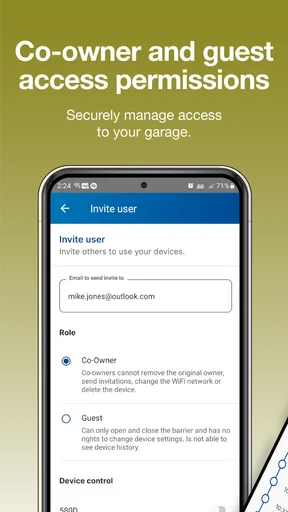
There is a useful caregiver scenario too. If a family member is waiting for assistance, another household member may be able to control the compatible garage door without physically reaching the property’s usual switch. That can simplify coordination, although I would be careful about sharing access casually. A garage door is an entry point to the home, so convenience should be balanced with a clear understanding of who is allowed to operate it.
For visitors or deliveries, I would use the app selectively rather than treating it as a universal remote. Opening the door for someone can be convenient, but it also requires attention to timing and confirmation. I would not open it merely because I expect someone to arrive; I would first verify who is there and close it again when appropriate. The app can reduce friction, but it does not remove the judgment required around physical access.
The same principle applies when helping a person with limited mobility. Remote operation can make it easier for them to enter without waiting beside the door, but the person should still have a reliable way to know whether the door is safe to pass through. If visual confirmation is difficult, another person may need to provide confirmation. The app is an access aid, not a substitute for a complete safety routine.
What to check before depending on it away from home
Before I would rely on Nice G.O. during travel or an urgent situation, I would test it under ordinary household conditions. I would confirm that the compatible garage equipment responds consistently, that I can recognize the door’s state, and that the people who may need it know the same steps. Testing from inside the garage and from the driveway is more informative than testing only while standing beside the door.
I would also establish a backup plan. That could mean keeping the physical control usable, making sure another trusted person knows how to operate the door, or deciding what to do if the phone is unavailable. This is especially important for users who depend on remote access because of mobility limitations. A feature that works most of the time is helpful, but an inclusive setup should not leave someone stranded when the preferred route is unavailable.
One non-obvious advantage of this approach is that it exposes household confusion early. If two people describe the door state differently or are unsure which action closes it, the problem is not just the app; it is the routine around it. A short practice session can reveal whether labels, screen brightness, phone placement, or confirmation habits need adjusting.
Remaining barriers that should shape your decision
The first barrier is equipment compatibility. Nice G.O. is designed around Nice’s connected garage-door ecosystem, so it is not a universal replacement for every opener. If your existing hardware is from another manufacturer or lacks the necessary connection, the app may not be useful without additional compatible equipment. I would identify the exact opener and connected components before expecting the phone to work.
The second barrier is that mobile access does not eliminate environmental hazards. A phone command can start the door, but it cannot make a blocked doorway safe or guarantee that a child, pet, bicycle, or vehicle is clear. Anyone using the app should keep the same visual checks they would use with a wall button. Remote control increases reach; it does not remove responsibility.
There is also a privacy and household-management consideration. A garage-control app belongs on a device that may be shared, lost, or left unlocked. I would think carefully about who can access the phone and whether a borrowed device should be used to operate the door. For families with different abilities, the goal should be dependable authorized access, not simply giving every person the same credentials or device.
Another limitation is the difference between accessibility and convenience. A larger phone screen may help someone read the control, but it does not automatically make the app suitable for a person with severe visual, motor, hearing, or cognitive needs. The experience depends on the phone, the user’s settings, the garage layout, and the clarity of the door’s feedback. I would evaluate the complete chain rather than judging the app in isolation.
People who want extensive automation may also find the focused design restrictive. Nice G.O. is about mobile garage access and control, not about replacing a broad smart-home hub. If your priority is combining lighting, cameras, locks, routines, and voice assistants in one place, a wider platform may fit better. The trade-off is that a broader platform can also be more complicated to navigate, which may work against the accessibility needs that make this app attractive.
Finally, the free price removes one obvious adoption barrier, but it should not be confused with universal suitability. The real cost may be the need for compatible Nice hardware, household training, and a backup method. For an existing Nice user, that can be a reasonable exchange. For someone starting from scratch, the decision should be based on the whole garage setup rather than the app alone.
My inclusive verdict for Nice G.O.
I recommend Nice G.O. to people who already have compatible Nice garage equipment and want a straightforward additional way to operate the door. Its most convincing value is practical: it can move the control point from a fixed wall location to a phone that is easier to position, enlarge, and carry. That can support older adults, people with limited reach, caregivers, drivers with temporary injuries, and anyone who regularly arrives with their hands full.
I would be more cautious for users who need guaranteed non-visual feedback, highly simplified interaction, or a control method that remains available when a phone is lost or uncharged. In those cases, I would keep a physical alternative and test the complete routine with the actual user. A different access method may be better if the phone itself is the main obstacle.
The app’s Everyone age rating and free availability make it easy to consider for a household, while its established version 1.1.11 indicates that it is not merely an unfinished first experiment. Still, the important measure is not how polished the idea sounds. It is whether each person who needs the garage can identify the control, operate it without strain, understand the result, and recover safely when the preferred method fails.
My final view is that Nice G.O. is best understood as an additional access route, not a complete accessibility solution. Used alongside the existing control and a clear confirmation habit, it can make daily garage access noticeably easier. Its strongest users are those whose barriers involve reach, distance, weather, or carrying things. Its weakest fit is anyone who needs the app to solve every kind of sensory, motor, or reliability problem on its own.
For that audience, I would install it, test it during a normal arrival and departure, adjust the phone’s readability settings, and teach every regular user the same confirmation routine. If those trials feel natural, the app can become a genuinely useful part of the home. If they expose uncertainty about compatibility, door status, or backup access, I would keep looking for a solution that matches the person’s needs more directly.
Verdict
Strengths of Nice G.O.
- Simple interface makes core features easy to find.
- Lightweight design should run smoothly on many devices.
- Useful for quick sessions when you have limited time.
- Clear visual feedback helps users understand their progress.
- Offers a focused experience without unnecessary distractions.
Limitations of Nice G.O.
- Some features may feel limited compared with larger alternatives.
- The interface can become repetitive after extended use.
- Performance may vary on older or less powerful devices.
- Limited customization may not suit users wanting more control.
- Some content may require patience before it becomes engaging.
Similar Picks in This Category
View All
Universal TV Remote Control
CodeMatics Media Solutions3.9

AlfredCamera Home Security app
Alfred Systems Inc.4.7

Planner 5D: AI Home Design
Planner 5D4.5

Universal Tv Remote-Cast to TV
One Music Player4.1

Zillow: Homes for Sale & Rent
Zillow Group4.8

99acres Buy/Rent/Sell Property
infoedge.com4.3
Frequently Asked Questions
What is Nice G.O. and what can I use it for?
Nice G.O. is a mobile application designed to provide users with a convenient way to access and manage its available services from an Android or iOS device. Depending on the version and region, the app may include account management, service discovery, notifications, and other interactive tools. Before downloading, check the official store description to confirm that its features match your needs.
Is Nice G.O. free to download and use?
Nice G.O. can generally be downloaded without an upfront charge, but some functions may depend on the service, account type, location, or optional purchases. Users should review the app’s store listing for information about subscriptions, in-app payments, or additional fees. Downloading the application is not always the same as receiving unrestricted access to every feature.
Which devices are compatible with Nice G.O.?
Compatibility depends on the operating system and the minimum version supported by the current release. Nice G.O. may be available for Android and iOS, although older phones or tablets might not meet the required specifications. Before installing, review the Google Play or App Store compatibility information, and make sure your device has enough storage and a stable internet connection.
Does Nice G.O. require an account or personal information?
Some features of Nice G.O. may be available immediately, while others can require registration or sign-in. Depending on how the app works, users may be asked for information such as an email address, phone number, profile details, or service-related data. It is worth reading the privacy policy and permissions list before creating an account, especially if personal information is involved.
Does Nice G.O. work without an internet connection?
Nice G.O. is likely to require an internet connection for downloading current content, synchronizing information, signing in, or using online services. Certain screens or previously loaded data may remain accessible offline, but offline functionality can be limited and may vary between versions. For the most reliable experience, use a stable Wi-Fi or mobile-data connection and keep the app updated.
